Helium is a Chromium-based privacy browser designed to natively support Google services. Many people choose this browser because it aggressively enforces HTTPS and restricts third-party cookies by default. However, as amazing as this browser is, it also has its issues. For instance, new reports indicate that the Helium browser is automatically logging users out of Google.
Understanding why Helium Browser is automatically logging users out of Google
One notable feature of the Helium browser is its default ability to block third-party cookies. The browser utilizes a Chromium fork that features strict cookie and site data management. According to new reports, it seems Helium’s privacy-focused modifications are currently conflicting with Google’s OAuth 2.0 and API authentication mechanisms. This explains why Helium Browser is automatically logging users out of their Google accounts.
When describing the issue, the affected user said the browser often prompts re-authentication as soon as they restart it. The same thing happens when users switch profiles or stay inactive for a short period. When trying to sign in, some users also get warnings like: “This browser or app may not be secure”.
How to fix this issue?
Due to the frustration caused by this issue, many users are already planning to ditch Helium for other privacy-focused browsers like Brave. If you’re also considering this move, you may want to pause and try the following workarounds first.
- One of the workarounds, shared on X by the developer of Helium, involves allowing third-party cookies, which are specific to Google.com. This automatically addresses the issue by preventing the Helium browser from logging users out of their Google accounts. Many users who tested this workaround have confirmed that it’s very effective.
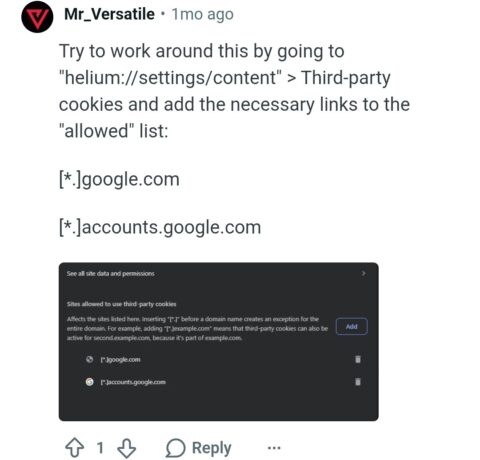
- Another alternative workaround involves visiting helium://settings/cookies. Next, consider adding the following websites as exceptions. The first one is google.com. The second website is accounts.google.com. This setup allows you to permit third-party cookies.
- Alternatively, you can consider initiating login through Gmail and other Google domains. As long as you’re able to get one domain to authenticate successfully, you can rest assured that all linked services will also log in.
The aforementioned workarounds should work on all devices. For Windows users, if the steps fail to fix the issue, it could mean your user data is corrupted. In this case, we recommend uninstalling Helium and reinstalling it.
As a privacy-focused browser, Helium will most likely continue the automatic logging out of Google accounts. This explains why trying the aforementioned workarounds is pretty important if you still want to enjoy Helium.

Add Comment