
If you’ve ever used Gemini before, you’ll agree that it doesn’t allow users to download their results directly as PDFs, CSVs, or Zips. Instead, this chatbot only supports copying and pasting broken formatting text. Today, however, reports indicate that Gemini now allows its users to download and export their files, such as Zip and PDF, directly from chat.
Users can now download and export ZIP or PDF files on Gemini: Here are the Benefits
From mentions on different social media platforms, it seems the new feature just dropped yesterday. This offering now allows users to move away from the traditional copying and pasting of broken formatting text. Now, they’ll be able to ask the chatbot to provide their results in a file type that suits their needs. Some file formats users can now extract directly from Gemini include:
- PDFs
- Plain text documents
- CSVs
- Bundled ZIP archives
What’s even more interesting is that Gemini now offers a new file directory. Built into the chat view, this offer allows users to keep generated files organized when you expect multiple results.
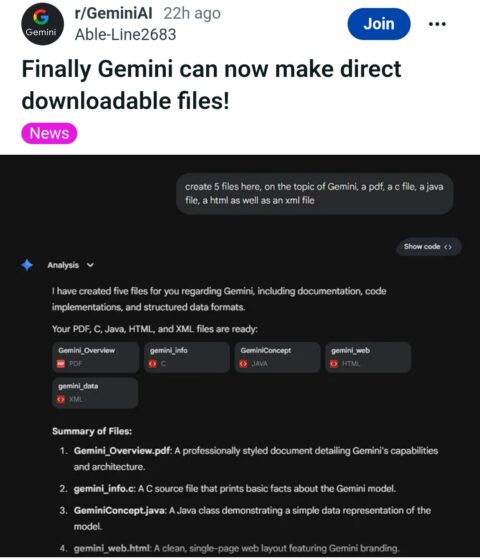
Before the introduction of this feature, users often struggled to use Gemini. To get the right results, they often give the chatbot a prompt: “Don’t put the language tags in the markdown; they break the output in the chat”. According to a Reddit user, this new feature will take away the boredom of having to instruct the model every time. It not only takes away the boredom but also saves time, especially for people who do deep research or coding.
Does this feature have limitations?
No doubt, Gemini’s new capability of letting users download and export Zip or PDF files from chat is a big update. However, as amazing as this feature is, it also has its limitations. While standard Word documents work perfectly, the chatbot still struggles to support transparent image files.
Furthermore, users who tested the feature mentioned that it’s currently buggy. So far, people have noticed bugs like:
- Web app crashing bug
- Failure to apply specific file edits without recreating the output from the beginning.
You should keep in mind that Google hasn’t yet explained exactly how the new feature works. Let’s hope that the team will give us the exact scope of supported file types soon. We’re also hopeful that they’ll address all bugs associated with the new update soon.

Add Comment