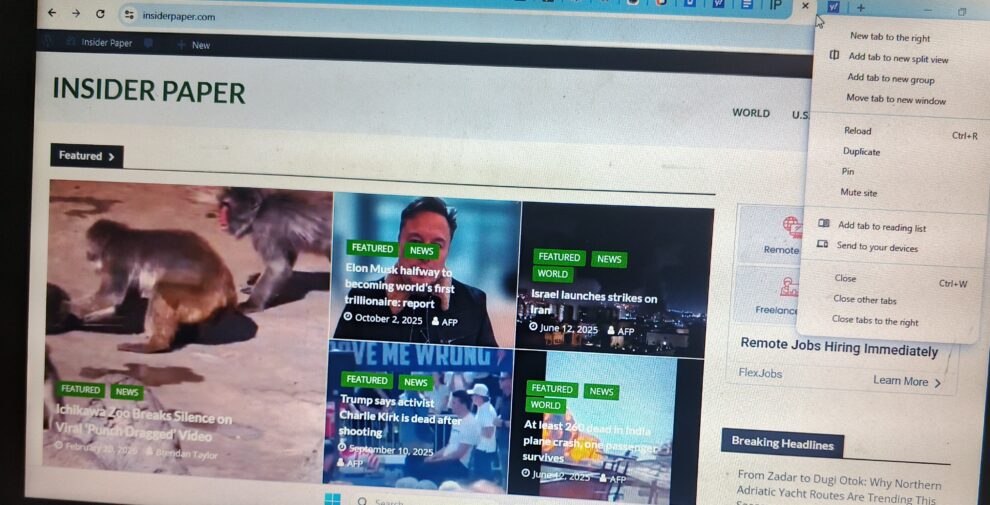
Excitement filled the air when Google finally rolled out Chrome 145 to stable desktop channels back in February 2026. This update came with a few amazing features, including Permission Split. The split view feature improves multitasking by giving users access to use a single window to put two tabs side-by-side. No doubt, this feature works as intended. However, the ‘open link in split view’ also came with an issue, which Google Chrome now plans to roll out a fix for.
Understanding the ‘Open Link in Split View’ Issue
In case you didn’t notice, the split view issue often surfaces due to accidental activations. Here’s a refresher, the activation of split view works in three different ways:
- Activate by right-clicking a tab
- Right-clicking a hyperlink to activate the feature
- Moving a tab to the edge of a window also activates it
Recall that when Chrome initially introduced split view, it was included in the context menu as the second option. The accidental click on split view occurs due to muscle memory, with users intending to either add a tab group or open a new window. The accidental trigger also happens when users move a tab.
Since the release of Chrome 145, many users have complained across different social media platforms about the disruptions it brought. For instance, a user on the Google Chrome support group requested a fix for the “irritating” ‘open link in split view’ issue.
Here’s the solution for the Split View Issue
Spotted by PiunikaWeb, the Google Chrome support team has now rolled out its plans on how to address the issue. In a bug report, the team disclosed two solutions. Firstly, the team will move the split view feature right below the “open link in new window” option. Secondly, the team will adjust the drag-and-drop thresholds, which trigger split view when you move a tab to the window edge.

Also, many users requested the Google Chrome team to roll out a toggle as a fix to disable the ‘open link in split view’ feature. However, this is likely never going to happen. The team says:
“We understand many of you requested a master toggle to disable Split View completely. While we are not introducing a global switch at this time, this wasn’t a decision made lightly. Our goal is to evolve Chrome’s multitasking capabilities while maintaining a streamlined set of configurations that remain manageable for all users. We believe that by refining the context menu placement and drag-and-drop sensitivity of the feature, we can provide value to those who use it without it being intrusive for those who don’t.”
With this fix, the aim of the team is to restore the muscle memory users built over many years. The solution will allow you to right-click and open a new window or tab without accidentally experiencing split screen.

Add Comment