
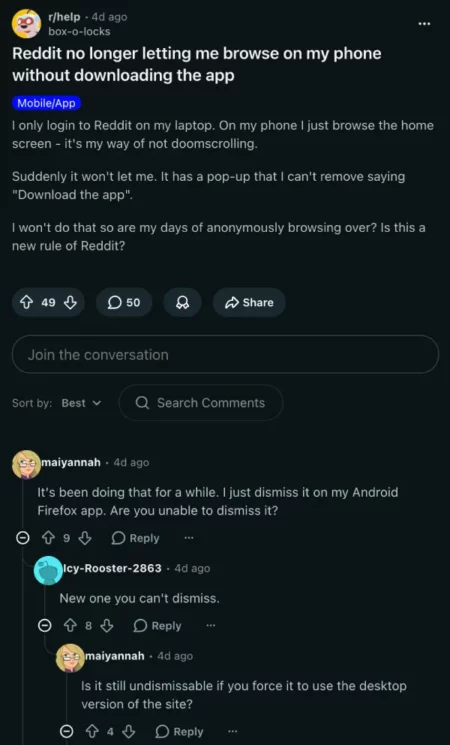
New reports indicate that some Reddit users are experiencing issues with logging in to their mobile accounts. When describing the situation, the affected users said accessing their Reddit accounts through the mobile browser is not working. That’s not all; the issue is forcing them to download the official app instead.
Why is Reddit Not Working on mobile browsers?
Based on reports across various social media platforms, the issue is accompanied by an un-dismissable banner. This banner appears when users browse on their mobile devices. As such, it prevents them from engaging with their pages. Once the banner appears, it becomes pretty difficult for users to access menus or scroll. They even find it very hard to read comments in this situation.
As noted by PiunikaWeb, this issue is likely an ongoing A/B test for some iOS and Android users. The issue freezes the screen, leaving users with just two options: they can either leave the site or download the app.
Are there workarounds yet?
To address the issue in which Reddit on the mobile browser is not working, some users tried a few troubleshooting steps. These include:
- Switching to the old.reddit.com
- Clearing cache
- Switching to the desktop version of Reddit on the mobile browser
- Using ad blockers
- Using Safari’s hide distracting items tool to zap the banner away manually.
The good thing is that these workarounds are working to some extent. Switching to the older Reddit version addresses the issue, but not consistently. It still leaves the issue when accessing media content like videos.
Using the desktop version of the mobile browser certainly works fine. The only issue here is that usability is significantly reduced. Yes, the text becomes very tiny, requiring you to constantly zoom in every time. You can also use ad blockers to address the issue where Reddit on mobile browsers is not working. A user said, “You can zap it away with the UBlock extension on mobile, but it’s a lot of clicks.” To do this, below are some steps you can follow:
- Open UBlock
- Choose the pop-up and the darkened overlay with the picker
- Click “create”
- Copy and paste the syntax below:
“! silence “install app” popup
www.reddit.com###app-upsell-blocking-bottom-sheet-seo
! now fix scrolling
www.reddit.com##body,html:style(overflow: auto !important)”
For now, we don’t fully understand why this issue is affecting many users. With many people now reporting it, we’re hopeful that the Reddit team will come up with an official fix sooner rather than later. We’ll continue to monitor the situation and update this post for you.

Add Comment