
X is, unarguably, one of the most used social media platforms today. But as amazing as this platform is, it also has its issues. Users often complain about various issues they encounter while using X. For instance, some Android users reported facing a blank notification bug a few weeks ago. Some users also complained of an issue where X links are not opening on Android devices. Adding to this list is a new bug that also affects Android users. The affected X Android users mentioned that they get a “Failed to send post” error message when replying to a post.
X users report a “Failed to send post” error on Android devices
New reports indicate that many X users are unable to post replies on the platform. When describing the issue, the affected users noted that their posts or replies only get stored in drafts. Looking at the reports so far, it seems this issue is widespread because it even shows on the platform’s trending pages.
One user said: “I’m getting a lot of “failed to send post” errors on @X What’s the deal? Is it a bug?” Another affected user said every reply he made eventually got stored in drafts.
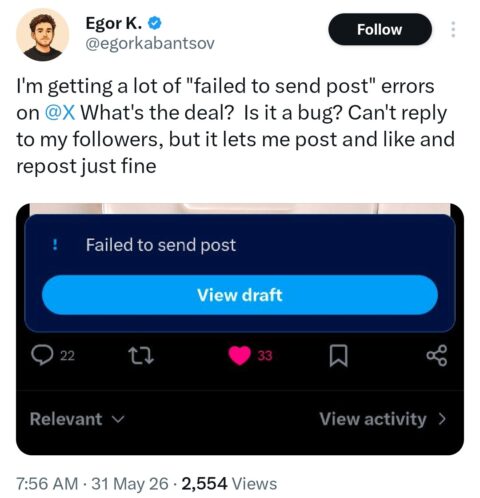
Although widespread, you need to understand that this issue doesn’t affect everyone on X. As noted by PiunikaWeb, this issue mainly affects the “New X Android app”. Yes, replying to posts works perfectly on the regular X Android app. However, creating original content still works correctly on both platforms.
Are there workarounds yet?
At the time of making this post, X is entirely silent about this issue. As such, there’s no official fix from X to prevent the “Failed to send post” error message on Android devices.
The good news however is that there are some simple workarounds you can try. As suggested by some users, below are some things you can do to prevent the error message:
- Consider switching to the web version
- Clear your X app data and re-login to the platform.
- Consider switching back and forth between the old and new X apps.
- Switching to the iOS X app works fine
We’ll continue to monitor the X team for an official resolution. As soon as they address this issue, we’ll let you know about it.

Add Comment