
If your Instagram account was disabled and you’ve already submitted an appeal, the recovery process in 2026 is different from previous years. This change arises because of the ongoing reports of large-scale automated enforcement and account disablements affecting many legitimate users. So far, many users, businesses, and creators have reported sudden bans. Some even reported appeals getting stuck in review or “Account Integrity” flags, which appear to have been triggered by automated systems. Some accounts have later been reinstated after further review. If you currently encounter any of these issues, below is how you can recover your disabled Instagram account in 2026.
Step 1: Determine Your Exact Status
Today, Instagram has several different enforcement statuses. To recover your disabled Instagram account in 2026, you need to start by understanding why it was locked out.
- “Your account has been disabled”
It means your profile is not visible to the public and you’ve been locked out. In this case, you need to recover the disabled account in 2026.
- “Account Integrity”
This usually means Meta’s systems flagged the account as suspicious.
- “Appeal submitted”
You are waiting for review.
- “Decision reviewed and cannot be reversed”
Much harder, but not always impossible.
- “We suspended your account because it doesn’t follow our rules”
Typically requires identity verification and appeal.
The message you received matters because each follows a different recovery path.
Step 2: Complete Every Verification Request
Many restored accounts went through:
- Selfie video verification
- Government ID verification
- Email verification
- Phone verification
As such, you should get prepared to perform any of these verification processes. If Instagram requires any of them, you must:
- Use your real information
- Ensure the ID matches the account holder
- Submit clear photos
- Avoid editing images
Above all, make sure you don’t submit multiple different IDs unless requested.
Step 3: Submit a Strong Appeal
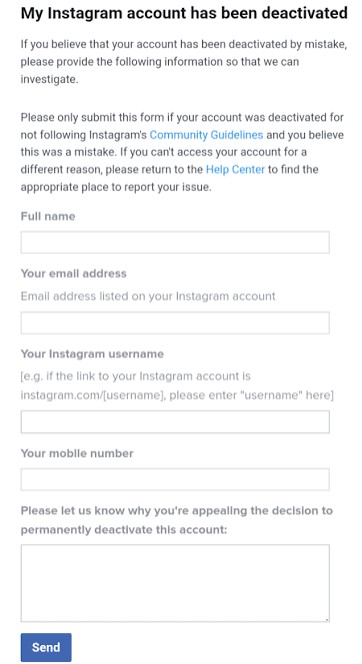
Most people hurt their chances by writing emotional appeals. Don’t do this! Instead use something like:
My account appears to have been disabled in error. I believe this may be a mistake caused by automated enforcement. I have reviewed Instagram’s Community Guidelines and do not believe I intentionally violated any policies. Please conduct a manual review of my account. I am willing to complete any identity verification required.
Thank you.
Bottom line: always keep your appeal short. When doing this, do not:
- Threaten Meta
- Mention lawsuits in the first appeal
- Use all caps
- Submit angry messages
Step 4: Do NOT Create New Accounts
Creating a new account immediately after your current one was disabled is a very big mistake.
Meta often checks for:
- New accounts
- Alternate accounts
- New devices
- New identities
The system see these things as attempts to circumvent enforcement. Bottom line: creating replacement accounts can hurt your recovery chances.
Step 5: Check Your Email Daily
Recovery requests often arrive from:
- instagram.com
- support.instagram.com
- mail.instagram.com
- facebookmail.com
Also check:
- Spam folder
- Promotions folder
- Junk folder
Many users miss verification requests because they land in spam.
Step 6: If Appeal Is Stuck
Current reports show some appeals remain pending for weeks or months. After 7-14 days, we recommend visiting Instagram Help Center. After that, consider resubmitting through available appeal forms if accessible. Also, ensure to only submit occasionally.
By occasionally, we mean you should avoid:
- 20 appeals daily
- Repeated uploads every hour
Doing multiple appeals or uploads could make the system to put you on temporary activity restrictions.
Step 7: Meta Verified Support (Often Helpful)
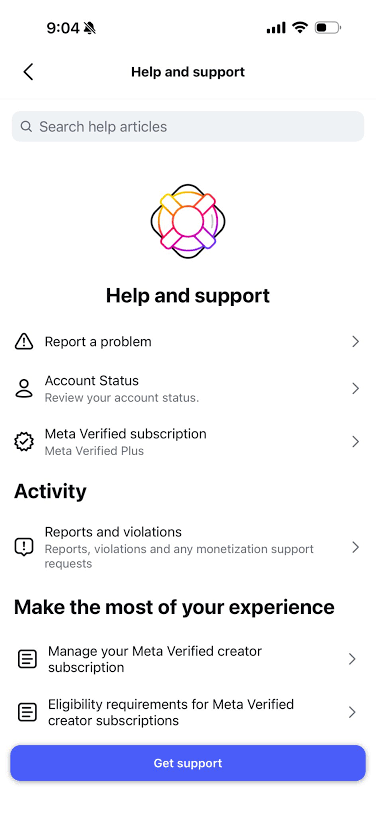
Many users have had success contacting support through Meta Verified.
This is possible if you still have access to:
- Another Instagram account
- Facebook account
You can purchase Meta Verified to gain access to human support channels. But understand that results vary. Even at that, this approach still remains one of the few ways to reach an actual support agent.
Step 8: Download Any Available Data
If Meta provides a data download option, ensure to take it immediately. Even if you expect restoration, the following information may become harder to recover later:
- Photos
- Messages
- Followers
- Contacts
Step 9: If You Run a Business or Media Account
If you run a media account or business, we recommend gathering the following evidence:
- Screenshots of disablement
- Appeal confirmation emails
- Business registration documents
- Ad receipts
- Brand ownership proof
This is crucial because business accounts are sometimes escalated differently from personal accounts.
Step 10: What NOT To Do
For you to recover your disabled Instagram account in 2026, you must avoid:
- “Instagram recovery experts”
- Telegram recovery services
- Fiverr account-unban sellers
- Anyone claiming an internal Meta contact
- Paying hackers
This is crucial because most of these individuals are scammers. Bottom line: No one outside Meta can legitimately guarantee restoration.
Current 2026 Reality
There have been widespread reports of accounts being disabled without clear explanations. Many users often jump into the conclusion that automated systems made mistakes. Some accounts have later been restored after additional review, and media investigations have documented cases where Meta acknowledged errors and reinstated accounts.
That means:
- A disablement is not necessarily permanent.
- A rejected first appeal does not always mean the account is gone forever.
- Patience is unfortunately part of the process right now.
Conclusion
To recover your disabled Instagram account in 2026, below a few steps we recommend:
- Submit official appeal.
- Complete all identity checks.
- Wait 7-14 days.
- Submit one follow-up appeal.
- Use Meta Verified support if available.
- Continue responding to any verification requests.
- Keep all screenshots and emails.

Add Comment