


The iOS 27 vs iOS 26 comparison starts with a major visual reset Apple introduced to the iPhone with iOS 26. Liquid Glass changed the look of menus, buttons and navigation across the system, while features such as Call Screening, Hold Assist, Live Translation and the first wave of Apple Intelligence made it a substantial update.
iOS 27 takes a different route. Rather than starting over again, Apple has focused on improving the foundation laid by iOS 26. The new version puts more emphasis on artificial intelligence, performance, customization and useful upgrades to everyday apps. Siri is the centerpiece, but Photos, Safari, Passwords and several other parts of the iPhone have also received notable improvements.
iOS 27 vs iOS 26: feature comparison
| Feature | iOS 26 | iOS 27 |
|---|---|---|
| Design | Introduced the Liquid Glass interface | Refined Liquid Glass with improved readability and adjustable transparency |
| Siri | Early Apple Intelligence integration | Siri AI with personal context, cross-app actions and conversation history |
| Photos | Visual Intelligence screenshot analysis | AI expansion, Reframe, improved object removal, ratings and keywords |
| Safari | Standard browsing features | Can monitor webpages and notify users when content changes |
| Passwords | Password management and security features | Can help automatically replace weak or compromised passwords |
| Phone | Call Screening, Hold Assist and voicemail summaries | Adds Call Context for surfacing relevant information during calls |
| Performance | Standard system optimization | Up to 30% faster app launches, 70% faster photo loading and 80% faster AirDrop |
| Parental controls | Ask to Buy and Communication Safety | Ask to Browse, category-based limits and expanded protections |
| FaceTime | Standard camera switching | Dual Capture on supported newer iPhones |
| Customization | Clear or Tinted Liquid Glass | Adjustable Liquid Glass slider and additional interface options |
Liquid Glass becomes more customizable
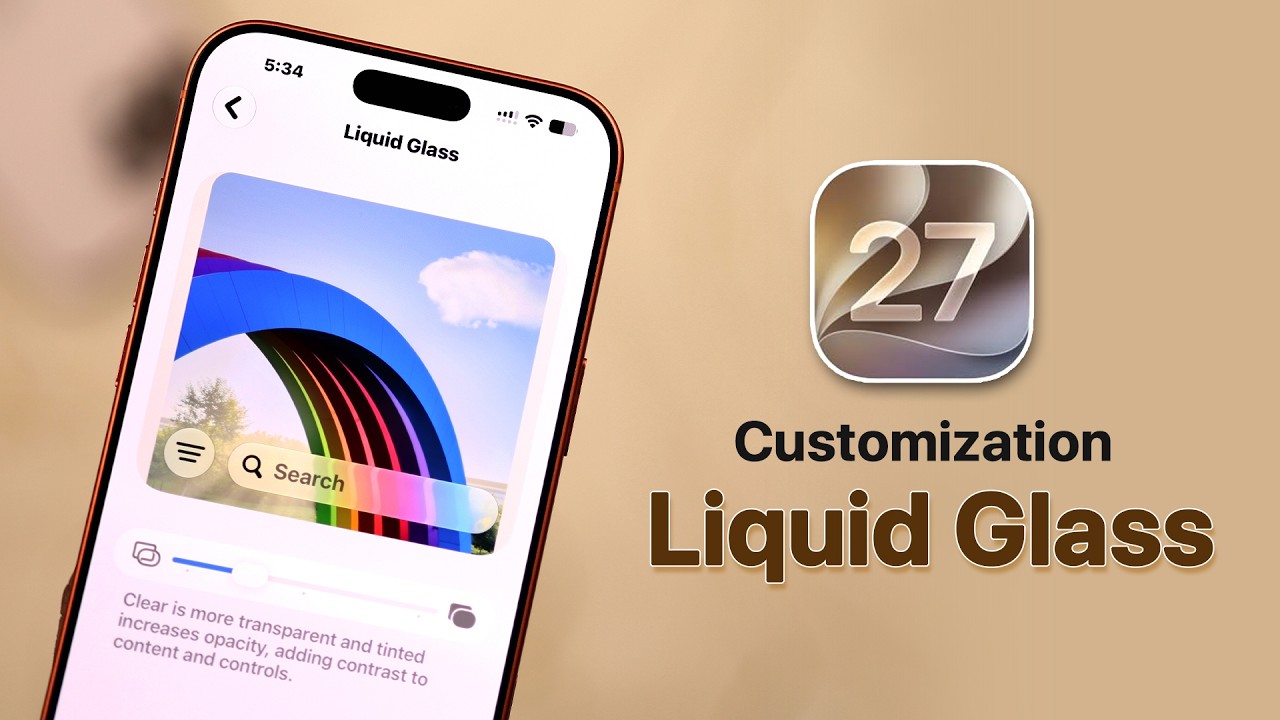
iOS 26 introduced Liquid Glass as its defining design change, but the transparent interface could sometimes make text and controls difficult to distinguish from the content underneath. Apple has addressed that in iOS 27 without abandoning the design.
A new Appearance section now includes a Liquid Glass slider. Instead of simply choosing Clear or Tinted as in iOS 26, users can move between More Clear, Default and More Tinted settings, including positions between those presets.
Apple has also changed how the material itself is rendered. Improved diffusion and refraction, darker edges and brighter highlights help separate interface elements from the content behind them. The default iOS 27 treatment is also more tinted than iOS 26’s Clear appearance.
The result is not another redesign. It is a more mature and customizable version of the interface Apple introduced last year.

Siri AI is the biggest iOS 27 upgrade
The most significant difference between iOS 26 and iOS 27 is Siri. In the iOS 27 vs iOS 26 comparison, Apple’s expanded approach to Siri is one of the clearest examples of how the newer software moves beyond the changes introduced last year.
While iOS 26 brought the first wave of Apple Intelligence features, iOS 27 turns Siri into a more contextual AI assistant. It can understand personal information contained in messages, emails and photos, respond to content currently visible on the screen and perform actions across apps.
Apple has also given Siri its own dedicated app. Previous conversations can be revisited instead of disappearing after an interaction, helping Siri behave more like an ongoing assistant rather than a tool for isolated voice commands.
There is a hardware divide, however. The most advanced Siri AI and Apple Intelligence capabilities require newer iPhones, meaning users with recent models will experience a more substantial upgrade than owners of older compatible devices.
Photos gets more powerful AI editing
Photos receives some of the most noticeable new tools in iOS 27.
Generative editing can expand an image beyond its existing borders, filling in the newly created space. Improved cleanup tools can remove larger unwanted objects, while Reframe can alter the perspective of a photo and use AI to generate missing areas.
Apple has also improved photo organization. Users can assign one-to-five-star ratings and keywords to photos and videos, making larger libraries easier to organize and filter.
Slideshows are more flexible too. They can be created from an album, collection or selection of photos, with controls for transitions, duration and background music. A completed slideshow can then be saved as a video.

Safari and Passwords become more useful
Safari gains a particularly practical feature called Notify Me. The browser can monitor a webpage and alert the user when something changes, such as when a product comes back in stock.
The Passwords app also becomes more proactive. For eligible websites, Apple Intelligence can use Safari to navigate to a site, sign in and replace a weak or compromised password with a stronger one.
These features reflect a broader theme in iOS 27: Apple is using AI less as a standalone attraction and more as a way to automate everyday tasks.
Smaller changes make a difference
There are plenty of smaller improvements across the system. FaceTime gains Dual Capture on supported newer iPhones, allowing the front and rear cameras to operate during the same call. Messages adds a drawing interface for sending sketches and handwritten notes.
Find My now allows custom location-sharing durations instead of limiting users to the presets available in iOS 26. Compatible AirPods also gain adjustable equalizer controls for lows, mids and highs.
The Lock Screen gets a compact clock layout as well, providing an alternative to the much larger clock style introduced with iOS 26.
Performance is another major focus. Apple says iOS 27 can deliver app launches up to 30 percent faster, photo-library loading up to 70 percent quicker and AirDrop transfers up to 80 percent faster.
Is iOS 27 a bigger upgrade than iOS 26?
iOS 26 remains the more dramatic visual update because it introduced Liquid Glass and fundamentally changed the appearance of the iPhone. iOS 27 is more evolutionary, but that does not make it a minor release.
For users with newer iPhones, Siri AI is potentially the biggest reason to upgrade, while the improvements to Photos, Safari, Passwords, customization and performance make the overall experience more polished.
Ultimately, the iOS 27 vs iOS 26 difference comes down to Apple’s priorities with each release. The easiest way to describe it is this: iOS 26 changed how the iPhone looks, while iOS 27 focuses on making that redesigned iPhone smarter, faster and more useful.